Specification and Compatibility Table
Manufacturers rarely publish a verified decibel figure in the listing data, so noise is marked "Not stated" below rather than guessed. Use suction, self-emptying, and runtime as your indirect noise signals: higher suction and an emptying dock are the loudest elements.
| Model | Rated Noise (dB) | Max Suction | Self-Emptying Dock | Runtime | Control | Price |
|---|---|---|---|---|---|---|
| Vyzzle E20 | Not stated | 8000Pa | Yes | 180 min | App / Alexa | $251.99 |
| Tikom L8000 Plus | Not stated | 6000Pa | Yes (90-day capacity) | Not stated | LiDAR / mapping app | $219.99 |
| Tikom G8000 Max | Not stated | 5000Pa | No (self-charge) | 150 min max | App / remote | $149.99 |
| ILIFE A30s | Not stated | 10000Pa max | No (self-charge) | 150 min | App / Alexa / remote | $129.98 |
| MANVN (2.87" slim) | Not stated | Not stated | No (self-charge) | Not stated | Wi-Fi / app / voice | $109.71 |
| eufy 11S MAX | Not stated | Not stated | No (self-charge) | Not stated | Self-charging | $159.99 |
Last Updated: July 28, 2026
The products referenced on this page carry a combined 16,693+ verified Amazon customer ratings.
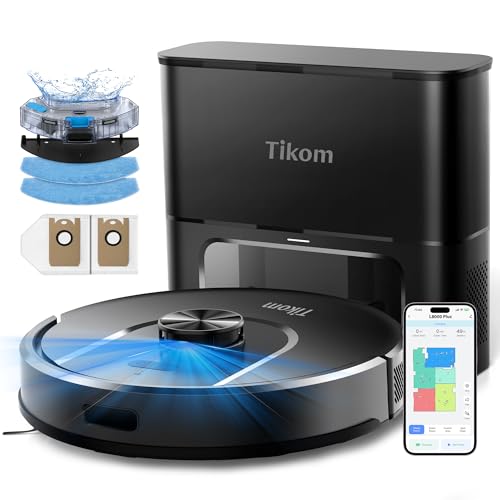
- 90-Day Hands-Free Cleaning: The 3L self-emptying dustbag holds weeks of debris, eliminating the need for frequent emptying. Enjoy effortless maintenance with this robot vacuum
- 6000Pa Ultra-Strong Suction: The L8000 Plus Robot Vacuum effortlessly lifts debris, pet hair, and deep-seated dirt from floors & carpets. It will automatically increase suction to
The Short Answer
Most robot vacuums run between roughly 55 and 70 decibels (dB) during normal cleaning, which lands somewhere between a quiet office and a normal conversation held a little too close. On max or turbo suction they climb toward the top of that range, and self-emptying docks are a separate, much louder event: the emptying cycle can briefly spike to 75-85 dB for a few seconds. That means the running vacuum is usually easy to talk over, but the dock dumping the bin will make you pause a phone call.
Where That Puts a Robot Vacuum on the Noise Scale
Decibels are logarithmic, not linear. A 10 dB jump sounds roughly twice as loud to your ears, so the difference between a 58 dB "quiet" mode and a 68 dB "max" mode is a genuinely different room, not a rounding error. For context, a refrigerator hum sits around 40-45 dB, normal conversation around 60 dB, and a corded upright vacuum around 75-80 dB. A good robot vacuum on a standard setting is meaningfully quieter than the upright you're replacing.
What the Decibel Number Actually Tells You (and What It Hides)
Rated dB Is Almost Always a Best-Case Figure
When a manufacturer or a listing prints a single decibel number, it is almost always measured on the quietest suction mode, on hard floor, at a fixed distance, in a treated room. Your kitchen is not that room. Real-world loudness is driven as much by your floors and furniture as by the motor.
Suction Power and Noise Track Together
Higher suction generally means more airflow and a faster-spinning motor, and both add noise. A vacuum advertising very high suction, like the ILIFE A30s at 10000Pa max or the Vyzzle E20 at 8000Pa, will be at its loudest on that top setting. That is not a flaw; it is physics. The practical takeaway is that you rarely need max suction on bare floors, so you can often drop the noise simply by not running the loudest mode by default.
The Dock Is a Separate Noise Source
Self-emptying models such as the Tikom L8000 Plus and the Vyzzle E20 add a second, sharper sound: a vacuum motor in the base that sucks the robot's bin into a bag. This runs for only a few seconds per cycle but is markedly louder than cleaning. If you care about noise, where you place the dock matters more than the robot's running dB.
How to Measure How Loud Your Robot Vacuum Is
You don't need lab gear. A phone and ten minutes gets you a number you can actually act on.
- Install a sound level meter app. Free "decibel meter" apps on iOS and Android are close enough for comparison purposes. Gotcha: phone mics are not calibrated, so treat the reading as relative, not certified. Use the same phone and app every time so your before/after numbers are comparable.
- Get a baseline of the silent room. Measure the room with the vacuum off. If your "quiet" room already reads 40 dB from a fridge and HVAC, that's your floor, and the vacuum's number sits on top of it.
- Measure at a fixed distance. Stand or place the phone about one meter from the robot as it cleans. Note the distance and reuse it, because loudness drops fast as you step back.
- Test each suction mode. Run quiet, standard, and max on the same patch of hard floor. Gotcha: don't compare a max reading on tile to a quiet reading on carpet; change one variable at a time.
- Test on carpet separately. Carpet raises the motor load and often the pitch. If you have carpet and hard floor, measure both.
- Capture the dock emptying cycle. For self-emptying models, start a manual empty and watch the peak reading. This is your loudest number and the one that will interrupt you.
- Log it. Write down mode, floor, distance, and dB. Now you can tell whether a filter clog or a schedule change actually helped.
What Goes Wrong: Noise Problems and How to Fix Them
It Suddenly Got Louder Than It Used To Be
Symptom: a whine, rattle, or higher-pitched roar that wasn't there last month. Cause: a clogged filter or full bin forces the motor to work harder, and hair wrapped around the brush roll or a stuck wheel adds mechanical noise. Fix: empty the bin, tap out or wash the filter per the manual, and cut hair off the brush and axles. This is the single most common reason a quiet robot turns loud.
The Dock Emptying Startles the Whole House
Symptom: a loud burst every time it returns home, often during a call or a nap. Cause: that's the base vacuum doing its job; it's meant to be brief but strong. Fix: move the dock out of bedrooms and offices, and schedule cleaning for when the room is empty. Many apps let you set the emptying to run less frequently or on a schedule.
Rattling or Buzzing Against the Floor
Symptom: a vibration-like buzz, worse on hard floors. Cause: a loose bin, an unseated filter cover, or debris in the brush housing. Fix: reseat the bin and filter until they click, and check that side brushes are screwed down. A thin robot like the MANVN at 2.87 inches or the eufy 11S MAX can also transmit floor rattle if it's running over a loose transition strip, so check the route.
It's Loud on Carpet but Quiet on Tile
Symptom: noise jumps in one room only. Cause: auto carpet-boost is kicking suction up when it detects pile. Fix: that's usually desirable for cleaning, but if the noise is the problem you can lower the default suction or use no-go/room settings on models with mapping, like the Tikom L8000 Plus or ILIFE A30s, to keep carpet cleaning off your quiet hours.
Scheduling Fights With Your Quiet Hours
Symptom: it runs while you're on video calls or the baby's asleep. Cause: default or voice-triggered schedules. Fix: set the clean time in the app for when the house is empty. App and voice control on models like the Vyzzle E20 and ILIFE A30s makes this a one-time setup.
How to Make a Robot Vacuum Quieter Without Buying a New One
- Run a lower suction mode by default. Reserve max for a scheduled deep clean when nobody's home.
- Keep the filter and brush clean. A clean airflow path is a quieter airflow path.
- Relocate the dock. Hard floor against a wall reflects and amplifies; a corner in a hallway or laundry room isolates the emptying burst.
- Schedule around your life. The quietest robot is the one running while you're at work.
- Close doors. Let it finish one room, then move on, rather than roaming past you all day.
If exact dB matters to you, check the current listing and owner reviews for each model yourself before buying, since noise is the one spec buyers describe most vividly and it is rarely printed in the headline data. For general background on how decibels are scaled and perceived, see the decibel reference on Wikipedia.
When the Fix Is a New One
Sometimes the noise isn't a clog you can clean out. Replace rather than keep troubleshooting when: the motor grinds or screeches even after a full filter-and-brush cleaning; the robot is so loud on your only suction setting that you can never run it while home; or the model has no app scheduling, so you can't move cleaning to quiet hours. Here are models that change something specific about the noise equation.
If You Want Cleaning You Never Have to Be Home For
A self-emptying model lets you push the loudest event, cleaning and the emptying burst, entirely into hours you're away. The Tikom L8000 Plus pairs a 6000Pa vacuum with a base rated for a 90-day capacity, so the dock empties less often and interrupts you less. Check Price on Amazon
If You Need Room-Level Control Over Where It Gets Loud
LiDAR mapping with no-go zones lets you keep high-suction carpet passes out of the bedroom and off your call schedule. The ILIFE A30s offers 10000Pa max suction with LiDAR navigation, home mapping, and no-go zones, plus app, Alexa, and remote control to set exactly when and where it runs. Check Price on Amazon
If Dock Noise Is the Dealbreaker and You'd Rather Empty by Hand
Skipping the self-emptying base removes the single loudest sound entirely; you empty a small bin manually instead. The ultra-slim MANVN robot vacuum is a self-charging, no-dock model at 2.87 inches tall that also slides under low furniture, trading the emptying burst for a quieter overall footprint. Check Price on Amazon
Frequently Asked Questions
Is 60 dB loud for a robot vacuum?
No, 60 dB is roughly normal conversation level and is typical for a robot vacuum on a standard suction mode. You can comfortably talk over it in the same room, though it may be picked up faintly on a phone call.
Why is my robot vacuum louder than it used to be?
Almost always a clogged filter, a full bin, or hair wrapped around the brush roll and wheels, all of which force the motor to work harder and raise the pitch. Clean the filter, empty the bin, and cut away tangled hair; the noise usually drops right back.
How loud is the self-emptying dock?
The emptying cycle is the loudest event, briefly spiking well above the robot's cleaning noise for a few seconds while a base motor sucks the bin into a bag. It's short, but place the dock away from bedrooms and offices and it won't interrupt you.
Can I run a robot vacuum at night without waking people?
Only if the dock and route avoid sleeping areas and you use the quietest suction mode. A quieter approach is to schedule it for daytime hours when the house is empty, using the app on models that support scheduling.
Does higher suction always mean more noise?
Generally yes, because more suction means more airflow and a faster motor, both of which add noise. A 10000Pa max mode will be louder than a standard mode, so use the lower setting on bare floors and save max for scheduled deep cleans.
How can I measure my robot vacuum's decibel level myself?
Use a free sound-meter app on your phone, measure the silent room first, then measure the vacuum at a fixed one-meter distance on each suction mode and floor type. The reading isn't lab-certified, but it's consistent enough to compare modes and to prove whether a cleaning fixed a noise problem.