Specification and Floor-Type Compatibility
| Model | Price | Suction | Navigation | Self-Empty Dock | Runtime | Floor Notes (from product data) |
|---|---|---|---|---|---|---|
| Vyzzle E20 | $251.99 | 8000Pa | LiDAR + smart mapping | Yes (self-emptying) | 180 min | Pet hair, carpet and hard floors; vacuum and mop |
| MANVN | $109.71 | Not stated | 3D obstacle avoidance | No (self-charging) | Not stated | Ultra-slim 2.87"; hard floors and carpets; vacuum and mop |
| Tikom L8000 Plus | $219.99 | 6000Pa | LiDAR + home mapping | Yes, 90-day capacity | Not stated | Pet hair, hard floors, carpet; vacuum and mop |
| Tikom G8000 Max | $149.99 | 5000Pa | Not stated | No (self-charge) | 150 min max | Hard floor, carpet, pet hair; vacuum and mop combo |
| ILIFE A30s | $129.98 | 10000Pa max | LiDAR, home mapping, no-go zone | Not stated | 150 min | Hard floor, carpet and pet hair |
| eufy 11S MAX | $159.99 | Not stated ("powerful suction") | Not stated | No (self-charging) | Not stated | Super thin; hard floors to medium-pile carpets |
Last Updated: July 28, 2026
The products referenced on this page carry a combined 16,693+ verified Amazon customer ratings.
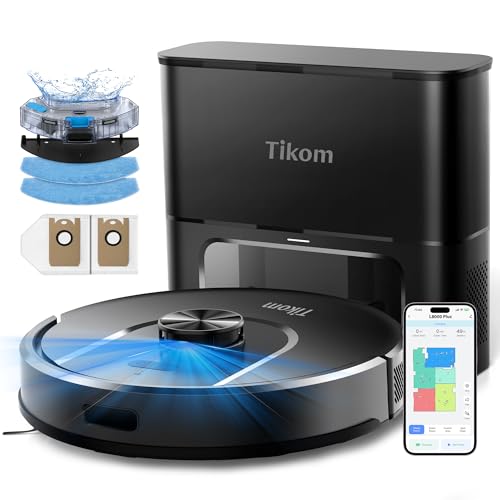
- 90-Day Hands-Free Cleaning: The 3L self-emptying dustbag holds weeks of debris, eliminating the need for frequent emptying. Enjoy effortless maintenance with this robot vacuum
- 6000Pa Ultra-Strong Suction: The L8000 Plus Robot Vacuum effortlessly lifts debris, pet hair, and deep-seated dirt from floors & carpets. It will automatically increase suction to
The Short Answer
Choose by your dominant floor surface first: for bare hardwood, tile and vinyl, prioritize a low-profile body, a good side brush and a mop; for carpet, prioritize raw suction (measured in Pa) and the ability to lift or avoid the mop. Mixed homes need both, so match the highest-pile carpet you own to the suction number and confirm the robot can cross your thresholds and clear under your lowest furniture.
Everything else, docks, apps, self-emptying, is convenience layered on top of that core fit. Get the surface match wrong and no feature list will save you.
Why Floor Type Is the First Decision, Not the Last
A robot vacuum meets your floor at three points: how hard it pulls (suction), how it moves debris toward the intake (brushes and airflow), and whether it can physically reach and cross the surface (height, wheels, thresholds). Each floor type stresses a different one of those.
Hard floors are forgiving on suction but unforgiving on clearance and streaking. Carpet is the opposite: it hides in low clearance but punishes weak suction. Rugs and thresholds add a movement problem on top. So the smart order is surface, then movement, then suction, then features.
Hardwood, Tile and Vinyl
On bare hard floors, fine dust and pet hair sit on top, so airflow and a well-shaped side brush matter more than a huge Pa figure. A mopping pass is genuinely useful here, which is why combo units like the Tikom G8000 Max and the Vyzzle E20 exist. Watch the body height so the robot can slide under toe-kicks and low sofas.
Low and Medium-Pile Carpet
Carpet is a suction game. Debris works down between fibers, and only strong airflow pulls it back out. Higher Pa ratings, such as the ILIFE A30s at 10000Pa or the Vyzzle E20 at 8000Pa, give you more margin on medium-pile. Be honest about your pile height, because most affordable robots are rated for hard floors to medium-pile, not deep shag.
Mixed Homes and Rugs
If you have both, the robot has to transition cleanly. Two things help: mapping so it knows where each surface is, and mop handling so a wet pad does not drag across your rug. LiDAR-mapping models such as the Tikom L8000 Plus and Vyzzle E20 let you set zones; check whether the mop lifts or must be removed by hand for carpet runs.
Step-by-Step: Match a Robot to Your Floors
- Measure your lowest clearance. Get under the bed, sofa and cabinet toe-kicks with a tape. If your lowest gap is around 3 inches or less, a slim body like the MANVN at 2.87 inches or the eufy 11S MAX matters more than suction. Gotcha: manufacturers measure the robot at its tallest point, usually the LiDAR turret, so a mapping robot may not fit where a puck-shaped one does.
- Identify your highest-pile carpet. Buy for the worst carpet you own, not the average. Gotcha: "works on carpet" and "deep-cleans carpet" are different claims; the eufy 11S MAX is described for hard floors to medium-pile, so shag is out of scope.
- Walk your thresholds. Note the tallest transition strip and any raised rug edges. Gotcha: a robot that clears a 0.7 inch threshold on paper can still stall if the approach is at a sharp angle or the floor is slick.
- Decide if you need a mop, and how it handles carpet. If most of your home is hard floor, a combo like the Tikom G8000 Max or Vyzzle E20 earns its place. Gotcha: a mop pad dragged onto carpet leaves damp streaks, so confirm zone control or plan to pop the pad off manually.
- Choose your suction band. Bare floors are happy at 5000-6000Pa; medium-pile wants the higher end, 8000-10000Pa as on the Vyzzle E20 or ILIFE A30s. Gotcha: Pa is a peak lab figure, not a guarantee across every surface, so treat it as a relative ranking, not an absolute promise.
- Pick a navigation type for your layout. Small, simple spaces do fine with bump-and-random units; multi-room and mixed-floor homes benefit from LiDAR mapping and no-go zones like the ILIFE A30s offers. Gotcha: mapping robots need a mostly consistent lighting-independent scan, but they still trip on cords and dark rugs, so tidy first.
- Decide how hands-off you want the dock. Self-emptying bases such as the Tikom L8000 Plus (90-day capacity) and Vyzzle E20 cut how often you touch the bin. Gotcha: self-empty docks are taller and need floor space plus wall clearance, so measure the dock spot before you buy.
- Confirm control fits your home. App, voice and remote options vary; the ILIFE A30s lists 2.4G WiFi, App, Alexa and remote, while the Tikom G8000 Max lists app and remote. Gotcha: many robots only join 2.4GHz WiFi, so a combined 5GHz-only router name can block setup.
What Goes Wrong, and What to Do About It
It streaks or leaves dust lines on hard floors
Symptom: fine gray tracks after a run on tile or wood. This is usually a full bin, a clogged filter, or a mop pad that is too dry or too dirty. Empty and rinse first, then run again on a clean pad; if it persists, the side brush may be bent or worn and needs swapping.
It won't clean the carpet, just rides over it
Symptom: crumbs and hair stay in the pile. Either the suction is under-matched to your pile height or the robot is in a low-power eco mode. Move to a max mode and, if it still fails, your pile is above the robot's rated range, which is a buying mistake, not a settings one.
It gets stuck at thresholds or rug edges
Symptom: repeated "robot is stuck" alerts near the same transition. The lip is above the wheel's climbing ability or the rug edge is flipping up. Use a low-profile transition strip, set a no-go zone at that spot on mapping models, or tuck the rug edge under.
The mop soaks the carpet
Symptom: damp patches where carpet meets hard floor. The robot carried a wet pad onto the rug because it has no zone separation or lift. Set carpet no-go zones, remove the pad for carpet-heavy runs, or schedule mop and vacuum passes separately.
It maps once then loses the map
Symptom: the app map resets or the robot re-explores every run. Often the dock was moved, the start point changed, or furniture shifted. Return the dock to a fixed, open spot and start runs from the dock so the LiDAR reference holds.
It won't finish before the battery dies
Symptom: it recharges mid-clean and leaves rooms undone. Larger floor plans need longer runtime; the Vyzzle E20 lists 180 minutes while several others list around 150. Recharge-and-resume helps, but for big homes, buy runtime up front.
Where a spec is not printed in the product listing, it is marked "Not stated" rather than guessed. Pa figures are the manufacturers' peak claims and are useful for comparing models to each other, not as an absolute measure of carpet performance. For any model you shortlist, go read the current owner reviews and rating breakdown on the product page yourself before deciding.
When the Fix Is a New One
Some floor mismatches are settings problems you can solve. Others are hardware limits no amount of tweaking fixes. Replace, rather than keep fighting, when the robot physically cannot fit your clearances, cannot climb your thresholds, or is rated below your pile height. Here are three models framed by what each one changes for a specific floor problem.
If your problem is low clearance under furniture
A tall mapping turret that will not fit under the bed is a dealbreaker you cannot patch. The MANVN is listed at an ultra-slim 2.87 inches for hard floors and carpets, which changes what it can reach.
If your problem is weak pull on medium-pile carpet
When crumbs stay in the pile at max mode, you have out-run the suction. The ILIFE A30s lists 10000Pa max suction with LiDAR mapping and no-go zones, which raises your headroom on carpet and lets you fence off rugs.
If your problem is emptying the bin too often on a big hard-floor home
Constant bin trips on a large plan is a dock problem, not a suction one. The Tikom L8000 Plus pairs a self-emptying base with 90-day capacity and LiDAR home mapping, which changes how hands-off a mixed hard-floor and carpet home can be.
Frequently Asked Questions
How much suction do I actually need for carpet?
For hard floors, 5000-6000Pa is plenty; for low to medium-pile carpet, aim for the higher end, roughly 8000-10000Pa as offered by the Vyzzle E20 and ILIFE A30s. Pa is a relative comparison figure, so match it to the highest pile you own rather than treating any number as a guarantee.
Will a robot vacuum scratch my hardwood floors?
The wheels and brushes are designed for hard floors, and grit is the real scratch risk, so keep the brush and bin clean. Sealed hardwood and vinyl generally tolerate a light mop pass, but check your floor finish maker's care guidance before running a wet mop routine.
Do I need a mop, or just a vacuum?
If most of your home is tile, vinyl or sealed wood, a combo like the Tikom G8000 Max or Vyzzle E20 saves a separate chore. If you are mostly carpet, a mop adds little and risks damp streaks, so a vacuum-focused unit is the cleaner fit.
Why does my robot get stuck on rug edges and thresholds?
The lip is likely above its climbing ability, or a rug corner is flipping up into the wheels. Add a low transition strip, tuck rug edges under, or set a no-go zone at that spot on a mapping model like the ILIFE A30s or Tikom L8000 Plus.
Can one robot handle a house with both carpet and hard floors?
Yes, if it maps the space and manages the mop across surfaces. Look for LiDAR mapping and zone control so a wet pad stays off the carpet, and buy suction for the carpet while the hard-floor cleaning largely takes care of itself.
Why won't my robot vacuum connect to WiFi?
Most robots, including many in this class, join only 2.4GHz networks, so a 5GHz-only or merged band can block setup. Split or temporarily separate your 2.4GHz band, then re-run the app pairing; the ILIFE A30s explicitly lists 2.4G WiFi support.
For background on how floor-cleaning appliances are categorized and how suction is described, see the overview at Wikipedia's robotic vacuum cleaner article.