Specification and Compatibility Table
Every value below comes only from the manufacturer listing data. Where a listing does not state a spec, it reads “Not stated” rather than a guess.
| Model | Suction (Pa) | Navigation / Mapping | No-Go Zones | Runtime | Base | Price |
|---|---|---|---|---|---|---|
| Vyzzle E20 | 8000Pa | LiDAR Navigation & Smart Mapping | Not stated | 180 min | Self-emptying | $251.99 |
| MANVN Ultra-Slim | Not stated | 3D Obstacle Avoidance (no mapping stated) | Not stated | Not stated | Self-charging | $109.71 |
| Tikom L8000 Plus | 6000Pa | LiDAR Navigation, Home Mapping | Not stated | Not stated | Self-emptying (90-day capacity) | $219.99 |
| Tikom G8000 Max | 5000Pa | App & Remote (mapping not stated) | Not stated | 150 min max | Self-charge | $149.99 |
| ILIFE A30s | 10000Pa Max | LiDAR Navigation, Home Mapping | Yes | 150 min | Self-charge | $129.98 |
| eufy 11S MAX | Not stated | Not stated (super-thin, self-charging) | Not stated | Not stated | Self-charging | $159.99 |
Last Updated: July 28, 2026
The products referenced on this page carry a combined 16,693+ verified Amazon customer ratings.
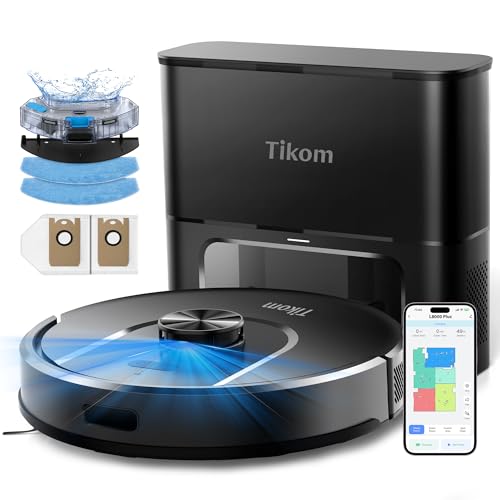
- 90-Day Hands-Free Cleaning: The 3L self-emptying dustbag holds weeks of debris, eliminating the need for frequent emptying. Enjoy effortless maintenance with this robot vacuum
- 6000Pa Ultra-Strong Suction: The L8000 Plus Robot Vacuum effortlessly lifts debris, pet hair, and deep-seated dirt from floors & carpets. It will automatically increase suction to
The Short Answer
Compare suction by the Pascal (Pa) rating first, then match it to your floors: hard floors and pet hair are comfortable in the 4,000-6,000Pa range, while medium-pile carpet benefits from 8,000Pa or more. For mapping, the single most important spec is the navigation type — LiDAR with saved home maps and no-go zones handles multi-room homes cleanly, while a gyroscope or bump-and-random unit is fine only for one open floor. Read those two numbers together, because a huge Pa figure on a robot that cannot navigate your rooms is wasted.
Why Suction and Mapping Are the Two Specs That Matter
Almost every other spec on a robot vacuum listing is downstream of these two. Suction (measured in Pa) determines whether the machine can actually lift debris out of a carpet pile instead of skating over it. Mapping determines whether it cleans your home in efficient rows and remembers where it has been, or wanders randomly and misses corners.
Marketing copy leans hard on the suction number because it is a single big figure that looks impressive. Mapping is harder to headline, so it hides in phrases like “LiDAR Navigation,” “Smart Mapping,” “3D Obstacle Avoidance,” or nothing at all. Learning to read both is the whole task.
What a Pa number actually tells you
Pa is a measure of the pressure difference the fan can create, not airflow or cleaning outcome directly. It is a useful comparison between models but not a perfect one, because brush design and seal quality also matter. Still, within a rough band it is the best single indicator you have on a spec sheet.
What a mapping label actually tells you
“LiDAR Navigation” means a spinning laser sensor builds a real floor plan; that plan can usually be saved, split into rooms, and edited with no-go zones. “3D Obstacle Avoidance” describes dodging objects, which is a different feature from building a persistent map. If a listing only says “app and remote control” with no mention of LiDAR or saved maps, assume it navigates without a persistent map.
Step-by-Step: How to Compare Two Listings
- Find the Pa number and write it down. Look for a figure like “8000Pa” in the title or bullets. Gotcha: some listings quote “Max” suction, which is the highest boost mode, not the everyday setting. Treat a “10000Pa Max” and a flat “8000Pa” as roughly comparable ceilings, not a clean win for the bigger number.
- Match that Pa to your hardest floor. If your toughest surface is tile or hardwood, mid-range suction is plenty. If it is medium-pile carpet or heavy pet shedding, prioritise the higher figures. Gotcha: a thin, low-profile robot may physically clean under furniture better than a high-suction one can reach, so height matters alongside Pa.
- Identify the navigation type, not just the word “smart.” Search the listing text for “LiDAR,” “mapping,” and “no-go zone.” Gotcha: “Smart Mapping” and “LiDAR” together is the strong case; “obstacle avoidance” alone is not mapping.
- Confirm the map persists. A saved multi-floor map lets you send the robot to one room. Gotcha: if the listing never mentions saving maps or rooms, do not assume it remembers your home between runs.
- Check runtime against your square footage. A larger home needs longer runtime or a robot that recharges and resumes. Gotcha: runtime is often quoted at the lowest suction mode, so real-world time on boost will be shorter.
- Check the base and maintenance interval. Self-emptying bases trade a bigger footprint for weeks of hands-off use. Gotcha: “90 days capacity” assumes a certain home size and debris load; heavy pet homes fill faster.
- Read the current owner reviews yourself. Before buying, open the reviews on the product page and read recent ones for your exact use case. Gotcha: star averages blend all versions and use cases, so filter to recent reviews and to complaints that match your floors.
What Goes Wrong When You Compare Specs
Chasing the biggest Pa number
Symptom: you buy the highest-suction robot and it still leaves crumbs in corners or tangles on rugs. Cause: suction does not fix poor navigation, brush tangling, or a unit too tall to reach under furniture. Fix: weight mapping and physical fit as heavily as Pa.
Assuming “smart” means it maps
Symptom: the robot cleans in random patterns and re-covers the same spot while missing a whole room. Cause: the model uses obstacle avoidance or gyroscope navigation, not persistent LiDAR mapping. Fix: only trust listings that explicitly name LiDAR and saved maps if room-by-room control matters to you.
Comparing “Max” suction to standard suction
Symptom: two robots feel equal in real life despite very different headline numbers. Cause: one number is a boost-mode ceiling and the other is a steady rating. Fix: compare like modes, and expect boost mode to drain the battery faster.
Ignoring height and floor type
Symptom: the robot cannot get under the couch or bogs down on thick carpet. Cause: profile height and brush design were overlooked in favour of the suction figure. Fix: check the stated thickness and the floor types the listing claims to handle.
Trusting the star average alone
Symptom: the highly rated robot disappoints on your specific floors. Cause: averages blend every use case. Fix: read recent reviews yourself and filter to your situation before deciding.
Two things to notice from the table. First, a high headline Pa can pair with a shorter runtime or a simpler base, so the numbers trade against each other. Second, some capable-suction units simply do not state a mapping spec — that absence is itself information when room control matters to you.
When the Fix Is a New One
Sometimes no amount of re-comparing specs helps, because the robot you own is missing the capability outright. These are honest signals it is time to replace rather than tweak: the unit has no persistent map and you have a multi-room home; the suction is genuinely too low for a carpet you added; or the profile is too tall to reach the spaces you actually need cleaned. Here are options described by what each changes for this comparison task, not ranked.
If you need a real, editable floor plan
The ILIFE A30s lists LiDAR Navigation, Home Mapping and explicit No-Go Zones, which is the clearest fit if your current robot wanders randomly and you want to fence off rooms or send it to one area. It also quotes a 10000Pa Max ceiling for boost cleaning. Check Price on Amazon
If you want mapping plus a hands-off base
The Tikom L8000 Plus combines LiDAR Navigation and Home Mapping with a self-emptying base rated for a long capacity window, which changes the task from “empty the bin often” to weeks of walk-away use while still giving you a real map. Check Price on Amazon
If your problem is reaching under low furniture
The MANVN Ultra-Slim is a 2.87-inch-thin robot with 3D obstacle avoidance, so it targets the height problem rather than the mapping one — useful when your issue is clearance under couches and beds, not room-by-room control. Check Price on Amazon
Frequently Asked Questions
How much Pa suction do I actually need?
For hard floors and everyday pet hair, mid-range suction around 5,000-6,000Pa is typically comfortable, as seen on the Tikom G8000 Max (5000Pa) and Tikom L8000 Plus (6000Pa). For medium-pile carpet, lean toward higher figures like the Vyzzle E20 (8000Pa) or the ILIFE A30s (10000Pa Max). Match the number to your hardest surface, not to the biggest headline.
Is LiDAR mapping worth it over gyroscope or random navigation?
If you have more than one room or want no-go zones and room-by-room cleaning, yes — look for listings that name LiDAR and saved maps, such as the Vyzzle E20, Tikom L8000 Plus, and ILIFE A30s. For a single open floor, simpler navigation can be enough.
Does “3D Obstacle Avoidance” mean the robot maps my home?
No. Obstacle avoidance means the robot dodges objects in its path, which is separate from building and saving a floor plan. The MANVN listing, for example, states 3D obstacle avoidance but does not state persistent mapping.
Why do two robots with different Pa feel the same in use?
Often one number is a “Max” boost figure and the other is a steady rating, so they are not directly comparable. Brush design, seal quality, and floor type also affect the real result, which is why Pa is a guide rather than a guarantee.
Should I trust the star rating when comparing specs?
Use it as a rough signal, then read recent reviews yourself for your exact floors. The eufy 11S MAX, for instance, shows a 4.1-star average across 16,693 ratings, but that average blends every use case, so filter to recent, relevant reviews before deciding.
Where can I learn the standard behind these safety and product claims?
For general consumer-safety context and any recall history on home appliances, you can check the CPSC recalls database before you buy.